Viva
- 4.6
- Rating
- 5.00M
- Installs
- Free
- Price

 Analysis by App-foxy
When I use an airline app, I do not judge it by how attractive the home screen looks. I judge it by what happens when I am already thinking about a flight: Can I find my reservation quickly? Can I complete check-in without guessing what comes next? Can I open my boarding pass when I am in a hurry? Viva is built around those practical moments, and that makes it a useful travel companion for passengers flying with Viva Aerobus.
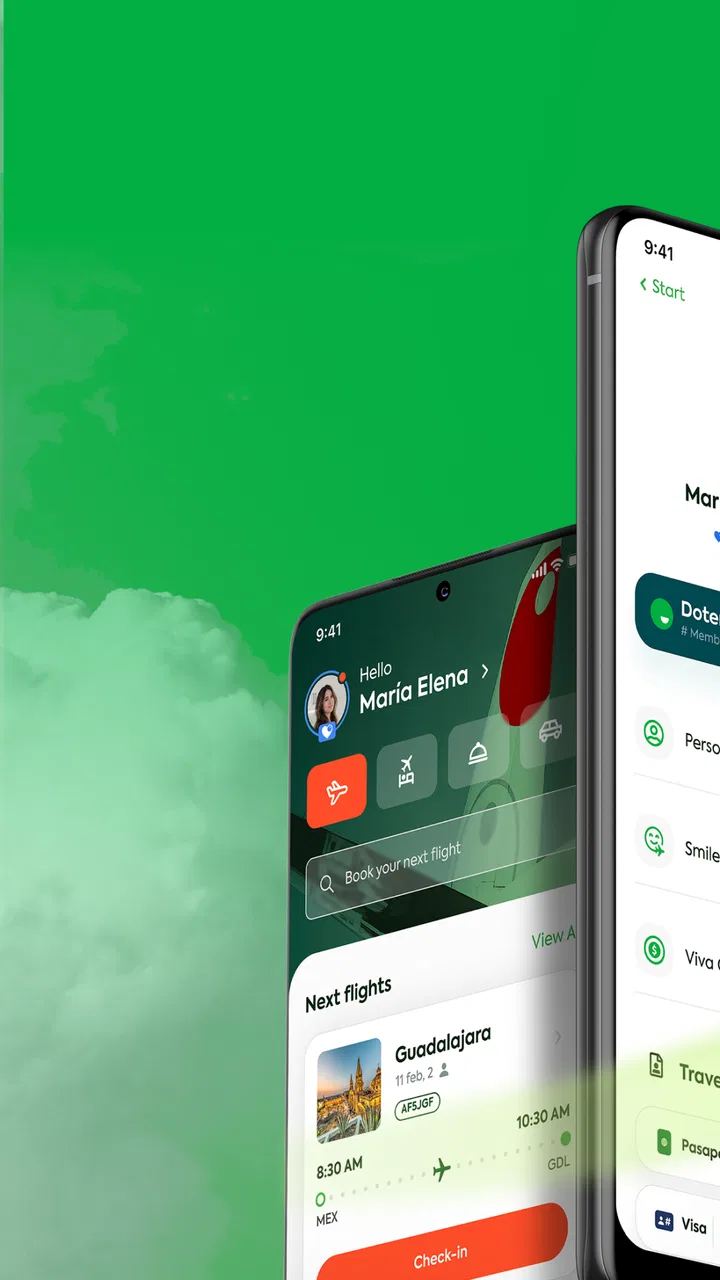
This is a free Travel & Local app from Viva Aerobus for checking in, opening a booking, reviewing travel documents, and keeping the boarding pass available on a phone. I found its purpose refreshingly direct. It is not trying to replace every travel tool I use; it concentrates on the airline-specific tasks that are awkward to manage through a general browser or a saved email.
My overall impression is positive, but it depends on using the app at the right time and understanding what it can and cannot solve. It is strongest when my reservation details are correct and I have enough time to work through the check-in process calmly. It is less helpful when the real problem is a booking mismatch, an unavailable airline service, or a phone that cannot reliably display the required travel document.
You May Also Like

 Blood Strike: 2.5 Anniversary
Blood Strike’s Loadouts Turn Every Drop Into a Tactical Gamble
A close look at Blood Strike’s custom loadouts: how fast access to signature weapons reshapes its battle royale rhythm, rewards preparation, and narrows the gap between fights.

 Pandora - Music & Podcasts
Pandora’s Music Is Easy to Start, but Harder to Recover
Pandora’s strength is its low-effort path from a seed to a station. Its weak spot is how much confidence it asks you to place in connection, setup, and quiet recovery.

 8 Ball Pool
 Is Built on Rivalries, Rematches, and Routine
A close look at the rivalries, rematches, shared routines, and unanswered safety questions that turn a quick pool match into a persistent mobile community.

 Samsung Music
’s Quiet Strength Is Playing What You Already Own
Its reach comes less from spectacle than from dependable access to a personal library. That simplicity is both the app’s strongest retention engine and its ceiling.

 AccuWeather: Weather Radar
AccuWeather Review: A Quick, Clear Forecast for Everyday Decisions
For everyday plans, the best forecast is the one you can understand quickly. AccuWeather makes rain timing, radar, and local conditions easy to act on, with a few trade-offs.

 Hill Climb Racing
Why Hill Climb Racing Still Turns Crashes Into One More Run
A tiny car, a bumpy hill and one more upgrade: Hill Climb Racing keeps resurfacing because its simple chaos makes every near-miss feel personal.
More From Our News Desk
View All News


Where passengers usually get stuck
I find the most stressful snags tend to happen before the airport: a reservation that will not surface, a check-in step that seems unfinished, or uncertainty about which traveler’s document is open. This section focuses on how to tell those situations apart before you start tapping through the same screens again. Next, I’ll cover a few checks that make the first attempt more dependable.
Finding the booking is the first real test
The most important early step is accessing the correct reservation. That sounds simple, but airline bookings can involve a confirmation code, passenger names, multiple travelers, or details entered in a slightly different format from the original purchase. If the app does not immediately show the trip, I would first compare the information on the booking confirmation with what I am entering rather than repeatedly trying random variations.
This is one of the places where an airline app feels different from a general travel organizer. A calendar app can remind me of a departure, and an email app can store the confirmation, but neither one is designed to connect me directly with Viva Aerobus check-in and travel documents. The dedicated app is more convenient once the reservation is recognized, yet it also depends more heavily on accurate booking information.
I recommend opening the reservation well before leaving for the airport. That gives me time to notice a spelling issue, an incomplete passenger detail, or a document that is not appearing as expected. Waiting until I am standing in a crowded terminal turns a small entry problem into a stressful one.
Check-in is not the same as simply viewing a trip
Another common point of confusion is assuming that seeing a reservation means every travel step is complete. In practice, I treat the booking view, check-in process, travel documents, and boarding pass as separate stages. I move through them deliberately instead of closing the app as soon as the itinerary appears.
The app’s store summary focuses on check-in, reservation access, documents, and boarding passes, which matches the way I use it. The useful habit is to confirm the final result rather than trusting that a tap was accepted. If a boarding pass is available, I open it before I need it and make sure the screen loads properly. If the app returns me to an earlier step, I take that as a sign to review the process rather than assuming I am ready to board.
Documents can be a practical bottleneck
Travel documents are not just another menu item. They are the part of the workflow I most want to verify before the journey begins. A phone with low battery, a weak connection, a locked account, or an unreadable screen can make an otherwise successful digital check-in feel incomplete.
My approach is to prepare a backup way to access the booking information, such as keeping the original confirmation available in my email. I do not rely on a single screen until I have opened it successfully and know where to find it again. This is not a criticism unique to Viva; it is a general weakness of replacing paper with a phone. The app makes the digital process easier, but it cannot remove the need for basic preparation.
Why a good rating does not remove every rough edge
Viva has an average rating of 4.6 from around 81 thousand ratings, and the app has passed 5 million installs. Those figures suggest that many passengers find it useful, but they should not be read as a promise that every booking will behave perfectly. Airline applications are tied to live reservation and airport processes, so a problem can come from the account, the booking, the connection, the device, or the airline system rather than from the interface itself.
I see the rating as evidence that the app solves a real need for a large number of travelers. I do not see it as a reason to skip sensible checks. The best experience comes from combining the app with a careful review of the booking details.
Setup checks that prevent avoidable trouble
A little preparation can save more time than troubleshooting in a crowded terminal, especially when several passengers share one booking. I’ll look at practical checks for the phone, connection, and each traveler’s documents, with an emphasis on testing the whole path rather than assuming that seeing the itinerary means everything is ready. The next section turns to sensible recovery steps if the workflow still stalls.
Start with the phone, not only the reservation
Viva lists a minimum operating system of Android 10 or later. Before installing or updating it, I check the phone’s software version and available storage. This is a small step, but it prevents wasting time trying to diagnose an installation or update issue on a device that does not meet the requirement.
The current version is 2.57.3, so I also prefer to use the latest version offered for my device rather than an older copy that may handle the booking flow differently. I do not update immediately before walking into the airport unless I have no alternative. An update can be sensible, but any travel-critical app deserves a quick test after updating.
Use stable conditions for the first login
I set up the app while connected to a dependable network, preferably before the travel day. If the reservation loads slowly, I can tell whether the issue is the connection or the booking details. Trying to perform the first access through an unstable public network makes that distinction much harder.
Once the trip is visible, I read through the passenger and itinerary information instead of jumping straight to the boarding pass. This gives me a chance to catch an unexpected mismatch early. I also close and reopen the relevant screen once, because a page that appears only after a long delay is not something I want to discover at the gate.
Keep the workflow simple for a group trip
For a booking with several passengers, I would avoid treating the process as one single confirmation. I check each travel document and boarding pass that appears, making sure I can identify whose document I am viewing. This is one of the most useful habits for families and groups: a complete-looking reservation screen does not automatically mean every traveler’s document has been reviewed.
I also keep the names and booking reference close at hand while setting up access. That is more reliable than switching between several apps and trying to remember which detail belongs to which traveler. The dedicated app is most helpful when I use it as the central place for the Viva Aerobus part of the trip, while leaving hotel, rail, and other airline information in their own tools.
Prepare the phone for the airport environment
Before departure, I increase the screen brightness enough to read the boarding pass comfortably and make sure the phone can stay powered through the journey. I do not assume that a screenshot, email, or saved page will behave exactly like the live app, so I test whichever backup method I plan to use.
There is also a human factor. If someone else in my group may need to present a document, I show them where it is instead of keeping the entire process in my hands. That matters when a phone is misplaced, a battery becomes a concern, or several people need to move through a checkpoint together.
Recovering the workflow when something goes wrong
When a task fails, I prefer to narrow down the cause before repeating it: confirm the booking details, check the connection, and identify the exact step that stopped. That approach helps avoid making a temporary loading issue harder to understand. I’ll explain how I would retry carefully, preserve a useful backup, and know when it is time to seek airline assistance instead.
When the reservation does not appear
I begin with the least disruptive checks: confirm the booking reference, compare passenger details with the confirmation, and make sure the app is connected. I then close and reopen the app before attempting repeated entries. Repeatedly submitting the same uncertain information rarely helps and can make it harder to remember what I already tried.
If the booking was made for more than one traveler, I check whether I am using the details of the passenger associated with the reservation rather than another member of the group. I also distinguish between a missing reservation and a reservation that appears but does not yet show every travel document. Those are different situations and deserve different next steps.
When check-in seems to stop halfway
I read the screen carefully and look for an unfinished selection or confirmation. If the app returns to the beginning, I restart the process once under a stable connection. I avoid switching rapidly between the app and other screens while a step is loading, because that can make it unclear whether the action was completed.
If the same point continues to fail, I compare the app with the booking confirmation and the airline’s current instructions. Some limitations are attached to the reservation or the travel process, not to the phone application. In that situation, trying the same button repeatedly is less useful than moving to the airline’s official support route or asking airport staff for guidance.
When the boarding pass is difficult to open
I first make sure I am looking at the correct passenger and segment. On a multi-person or multi-leg itinerary, it is easy to assume that one displayed document represents the whole trip. I then refresh the screen through the normal app flow and check the network.
If the document opens, I keep the app ready and retain the confirmation email as a second reference. I do not edit, crop, or obscure the boarding pass in a way that could make its details harder to read. A clear display is more valuable than a clever workaround.
When an update creates uncertainty
Because the app is actively versioned, I treat an update as something to test, not something to fear. After updating, I open the reservation, revisit the document area, and confirm that the boarding pass can still be reached. If the app behaves differently, I record the exact screen and action that caused trouble before contacting support. Clear information is much more useful than saying only that “it does not work.”
I would not uninstall the app as a first response if I am close to departure. Removing it can erase a convenient local access path and force me to repeat setup at the worst possible time. Basic checks, a restart, and a stable connection are safer first moves.
When the app is not the cause
Not every missing document or unavailable action points to an app defect; the reservation, network, or phone can be the limiting factor. I’ll separate those possibilities and explain when a broader travel organizer, confirmation email, or direct help is more useful than continuing to troubleshoot the app. That distinction leads into my final judgment about who should rely on it and how.
Booking restrictions can look like technical failures
An airline app is a window into a reservation, not a guarantee that every option is available for every passenger or itinerary. If a document is missing or a step cannot be completed, the cause may be linked to the booking itself. I avoid assuming that a blank area or unavailable action means the application is broken.
This is especially important for travelers who expect the app to solve changes, special requests, or unusual itinerary questions automatically. The app is excellent for routine access and digital travel documents. For a complicated booking issue, a direct conversation with Viva Aerobus or airport personnel may be faster and more appropriate.
A weak connection can imitate a missing feature
When a screen loads incompletely, I check whether other online services are also slow. If they are, I treat the problem as a connection issue first. I move to a more reliable network when possible and avoid making important assumptions from a partially loaded page.
I also keep expectations realistic about offline use. A boarding pass that was already opened may be easier to retrieve than a reservation detail that still needs to load, but I do not plan a journey around the hope that every function will work without connectivity. Preparing the document in advance is the safer choice.
The phone can be the weak link
A device running an older operating system, a nearly full storage area, aggressive battery saving, or an unreliable display can interfere with any travel app. Since Viva requires Android 10 or later, I would not judge the app from a phone that falls below that baseline. I would also avoid testing it for the first time on a borrowed device unless I have enough time to verify the result.
For iPhone users, the same principle applies even though the listed minimum operating system applies to Android. Keep the device updated through its normal system process, install the official app from the appropriate store, and test access before the trip. The important point is not the brand of phone; it is having a compatible, charged, dependable device.
When another travel tool is better
I would choose a general travel organizer when my trip includes several airlines, trains, hotels, and activities and I need one broad itinerary view. I would use email or a browser as a fallback when I only need to locate a confirmation and do not want another app. However, those alternatives do not provide the same airline-focused path to Viva Aerobus check-in and boarding documents.
For a passenger flying Viva Aerobus, the dedicated app is the more natural primary tool. For someone who rarely flies with this airline and already has a reliable paper or browser-based routine, installing it may feel unnecessary unless check-in and mobile documents are important to that person.
My practical verdict after using it as a travel companion
After weighing its focused airline tasks against the preparation they still require, I see Viva as a useful companion rather than a complete travel safety net. I’ll close by considering the situations where its free access earns a place on my phone, and where a different tool or extra backup makes more sense. The key is to choose it for the job it actually handles well.
Who will get the most value
I recommend Viva to passengers who want a straightforward way to manage the Viva Aerobus portion of a trip from a phone. It is particularly useful for people who dislike searching through email at the airport, families who want to review several passenger documents in one place, and travelers who prefer completing check-in before reaching the terminal.
The app is also a good fit for anyone who wants to separate airline tasks from the rest of a journey. I can use one tool for Viva Aerobus reservations and boarding passes, then keep hotel confirmations and unrelated transport in other apps. That separation is less glamorous than an all-in-one itinerary, but it makes the source of each document clear.
Who should approach it cautiously
I would not make the app my only travel safeguard if the reservation is complicated, the phone is unreliable, or the traveler is uncomfortable troubleshooting basic access problems. In those cases, I would prepare a second way to find the booking and allow extra time for assistance.
I would also skip it as a primary solution if I am looking for a complete trip planner rather than an airline utility. Viva is focused by design. That focus is its strength for Viva Aerobus passengers, but it means it is not a replacement for a broader travel-management app.
What makes the free download worthwhile
The app is free, rated for Everyone, and comes from Viva Aerobus itself. It was released on January 21, 2022, and its continued presence in the travel category gives it the feel of an established companion rather than a one-off booking page. I value that direct connection because it reduces the number of places I need to check before a flight.
My strongest recommendation is simple: install it early, open the reservation before travel day, complete the available steps carefully, and verify every document you expect to use. That workflow prevents the most common confusion and leaves time to switch to support when the issue belongs to the booking rather than the app.
In the end, Viva does not need to be an all-purpose travel platform to be useful. Its job is narrower and more practical: put Viva Aerobus reservations, check-in tasks, travel documents, and boarding passes within easy reach. I found it worthwhile when I treated it as part of a prepared travel routine rather than as a last-minute rescue tool. For Viva Aerobus passengers, that focused approach makes the free app a sensible download.
FAQs for Viva
01What is Viva and what features does it offer?
Viva is a versatile video editing app available for both Android and iOS platforms. It offers features such as trimming, merging, and adding music or effects to videos. Users can also leverage its diverse range of filters, animated stickers, and text overlays to enhance their content. Ideal for both beginners and advanced users, Viva supports HD video exports and social media sharing.
02Is Viva free to use or does it require a subscription?
Viva offers a free version with basic features, but it includes watermarks and ads. To unlock advanced features, remove watermarks, and enjoy an ad-free experience, users can opt for a subscription. The premium version provides additional tools, effects, and an enhanced editing experience, making it a valuable investment for frequent users.
03How user-friendly is Viva for beginners?
Viva is designed with an intuitive interface that is easy for beginners to navigate. It includes tutorials and guides to help new users understand the editing tools available. The drag-and-drop functionality, along with straightforward controls, ensures that even those with no prior experience can create professional-looking videos with ease.
04What are the system requirements for installing Viva?
To install Viva, users need a smartphone with Android 5.0 or iOS 10.0 and above. The app requires a minimum of 100MB of free storage space for installation and optimal performance. It's also recommended to have a device with at least 2GB of RAM to ensure smooth editing, especially when working with high-resolution videos.
05Does Viva support social media integration for sharing videos?
Yes, Viva supports seamless integration with popular social media platforms like Instagram, Facebook, and TikTok. Users can directly share their edited videos to these platforms from within the app. This feature simplifies the process of showcasing your creative work to a broader audience without needing to export and upload videos manually.
Pros
- User-friendly interface for quick navigation.
- Rich selection of filters and effects.
- Supports HD video export without watermark.
- Easy sharing to social media platforms.
- Regular updates with new features.
Cons
- Contains in-app purchases for advanced features.
- Ads can be intrusive and frequent.
- Some features require a stable internet connection.
- Limited music library without subscription.
- Occasional crashes on older devices.

Viva
Gallery